
Using AI to Automate Your Mundane Tasks
Tired of the hustle culture hamster wheel? The ultimate productivity hack is using AI to protect your peace. Discover how to automate the mundane and reclaim your mental energy. But should you really handover everything to AI?
AI
11/29/20254 min read
Feeling constantly "on" is the new normal. The ping of a late-night email, the endless scroll of a growing to-do list, the Sunday scowl that creeps in as you think about the week ahead. For years, we’ve been told achieving work-life balance is about better habits—more discipline, more planners, more saying "no."
But what if the solution isn’t just about you trying harder? What if it’s about having a smarter, always-on assistant? The secret to protecting your peace and excelling at work might just lie in leveraging Artificial Intelligence.
Stop Working Harder, Start Working Smarter
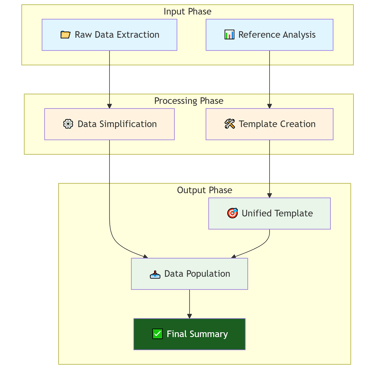
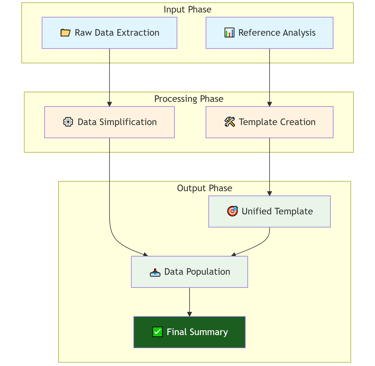
There's a document in which I was supposed to compile instrument data for about 800 times in excel sheet, each containing 50 fields. I already had the data from selection that I dumped in simplest format in excel sheet. Then I used smart prompts on Deepseek to come up with a template file for 32 unique set of equipment. Finally, provided simply prepared data to deepseek to populate data into the Template. It created organized dataset for 800 sheets.
The goal of using AI for balance isn’t to become a productivity robot. It’s the exact opposite: it’s to automate the mundane so you can focus on the meaningful—both in your career and your personal life. AI is excellent to ease your repetitive task by defining the perimeter of each task. You just need to prepare the template the covers the repetition.
Each AI has its current limitation in terms of what it can and can't do. Below is the list of tasks deepseek can perform for you on excel sheets:
Generate Excel formulas - create complex formulas for calculations, lookups, and data analysis
Explain features - Teach you how to use conditional formatting, pivot tables, etc.
Write VBA code - Create macros to automate tasks
CSV generation - Create structured data in CSV format that you can import into Excel
However, also note that currently it cannot:
Create actual .xlsx files - It cannot generate downloadable Excel files with embedded formatting
Direct formatting - The conditional formatting and smart tools would need to be applied manually in Excel
Think of AI not as a threat, but as your strategic co-pilot to automate cumbersome tasks. Its job is to handle the administrative drag so you can reclaim your mental energy and, most importantly, your time. Here’s how to put it to work.
1. Automate the Drudgery, Reclaim Your Hours
Your most finite resource is time, and it’s often stolen by small, repetitive tasks.
Tons of Unread Emails: Tools like Microsoft Copilot and Google’s Gemini can summarize long email threads into three bullet points, draft polite responses to routine requests, and even schedule meetings directly from your command. This can cut your email time in half, creating a clear boundary between work and home.
Conquer Content Creation: Staring at a blank document is a energy sink. Use AI like ChatGPT or Claude to jumpstart reports, brainstorm presentation outlines, and polish your prose. What used to take an hour can now take minutes, freeing you up for deep thinking or leaving on time.
Consistently maintain and update your tasks on Microsoft Onenote app.
2. Protect Your Focus, Guard Your Mental Energy
The constant context-switching of modern work is exhausting. AI can help you build guardrails for your focus.
Master Your Tasks: Project management platforms like Asana and ClickUp now have AI that can auto-generate project plans from a sentence, break down goals into actionable steps, and predict bottlenecks. This offloads the mental burden of organization, reducing decision fatigue.
Create Deep Work Zones: Use AI-powered focus apps to analyze your habits and automatically block distracting websites during your most productive hours. This helps you finish critical work efficiently, preventing it from spilling into your evening.
3. Outsource Life’s “Admin” for More Living Time
True balance isn’t just about logging off work; it’s about having the capacity to enjoy your life. Let AI handle the chores, maintain your calendar items and suggest you a proper balance routine:
Solve "What's for Dinner?": Prompt an AI with your dietary preferences and what’s in your fridge, and it will generate a weekly meal plan and a sorted shopping list in seconds.
Reignite Your Hobbies: Want to learn guitar or plan a trip? Ask an AI to create a personalized learning schedule or draft a day-by-day itinerary. It turns the friction of starting into the joy of doing.
Too overwhelming to think about what you can use the AI for?
You don’t need to overhaul your life overnight. Start small. Pick one task that drains you—whether it’s writing meeting summaries or planning your week—and delegate it to an AI tool this week.
Handing everything to AI is also not a sustainable work ethic. It's also very important to maintain the intellectual integrity of your thought process. Make sure you don't AI for problems which really stimulate your mind and keep it sharp. The idea is to get the leg-work done by AI and focus on problem solving part of the job.
The ultimate power of leveraging AI isn't about doing more work; it's about moving from being the overwhelmed operator of your life to becoming its intentional director. It’s the tool that finally helps you close the laptop, guilt-free, and be fully present for the moments that truly matter.
The future of work-life balance isn't just about working less. It's about working smarter, with AI handling the grind so you can focus on the growth.